

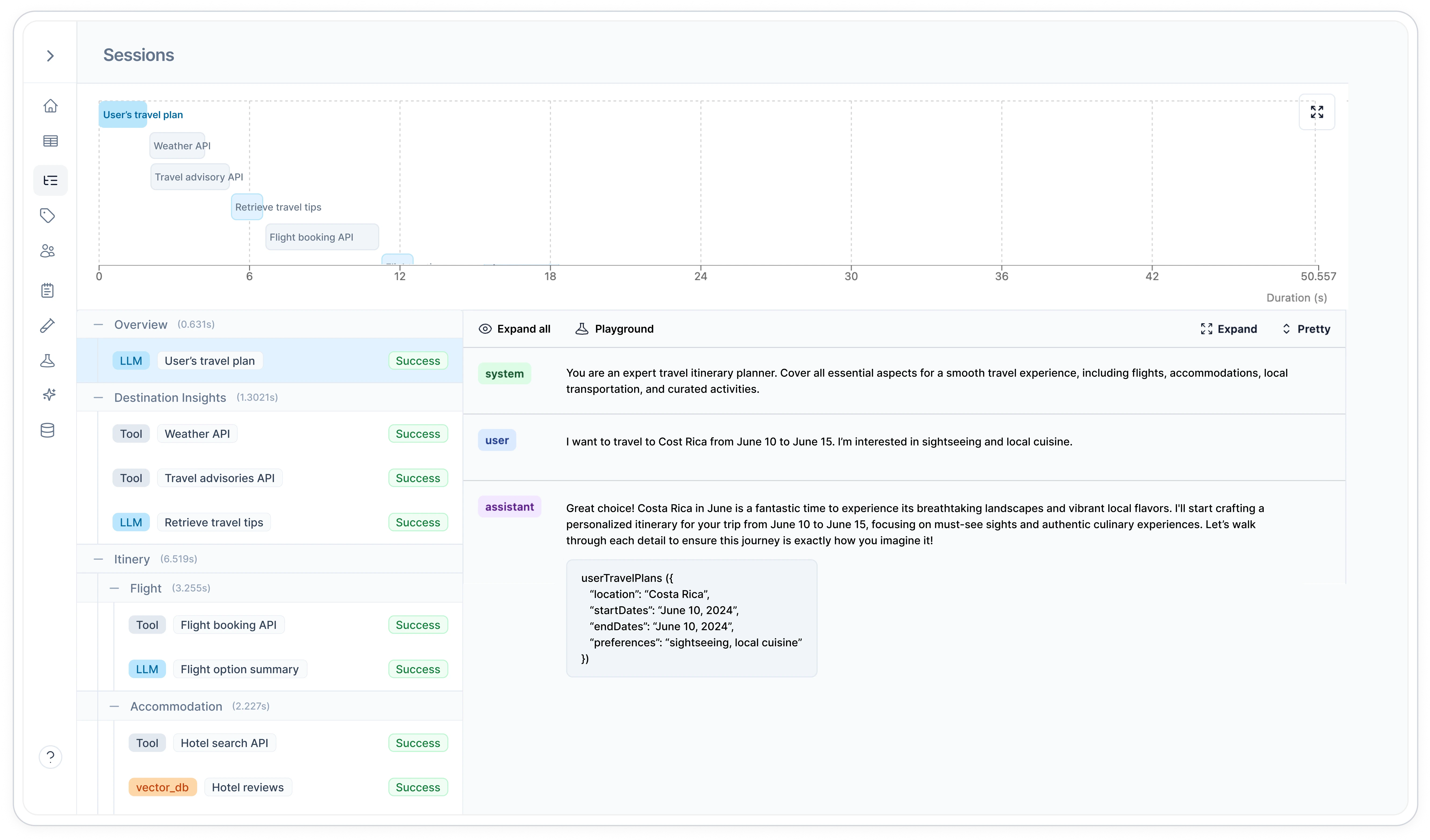
Why use Sessions
- Debug AI agent flows: See the entire agent workflow in one view, from initial request to final response
- Track multi-step conversations: Reconstruct the complete flow of chatbot interactions and complex tasks
- Analyze performance: Measure outcomes across entire interaction sequences, not just individual requests
Quick Start
Understanding Sessions
What Sessions Can Track
Sessions can group together all types of requests in your AI workflow:- LLM calls - OpenAI, Anthropic, and other model requests
- Vector database queries - Embeddings, similarity searches, and retrievals
- Tool calls - Function executions, API calls, and custom tools
- Any logged request - Anything sent through Helicone’s logging
Session IDs
The session ID is a unique identifier that groups all related requests together. Think of it as a conversation thread ID. What to use:- UUIDs (recommended):
550e8400-e29b-41d4-a716-446655440000 - Unique strings:
user_123_conversation_456
- Same ID = requests get grouped together in the dashboard
- Different IDs = separate sessions, even if they’re related
- Reusing IDs across different workflows will mix unrelated requests
Session Paths
Paths create the hierarchy within your session, showing how requests relate to each other. Path Naming Philosophy: Think of session paths as conceptual groupings rather than chronological order. Requests with the same path represent the same “type” of work, even if they happen at different times. Example: In a code review agent, all “security check” requests get the same path (/review/security) whether they happen early or late in the analysis. This lets you see patterns in the duration distribution chart - all security checks will be colored the same, showing you when they typically occur and how long they take.
Path Structure Rules:
- Start with
/(forward slash) - Use
/to separate levels:/parent/child/grandchild - Keep names descriptive:
/analyze_request/fetch_data/process_results - Group by function, not by time - same conceptual work = same path
Session Names
The session name is a high-level grouping that makes it easy to filter and organize similar types of sessions in the dashboard. Good session names:"Customer Support"- All support sessions use this name"Content Generation"- All content creation sessions use this name"Trip Planning Agent"- All trip planning workflows use this name
- Quick filtering - Filter dashboard to show only “Customer Support” sessions
- High-level organization - Group alike sessions for easy comparison
- Performance analysis - Compare metrics across the same session type
Configuration Reference
Required Headers
Unique identifier for the session. Use UUIDs to avoid conflicts.Example:
"550e8400-e29b-41d4-a716-446655440000"Path representing the trace hierarchy using
/ syntax. Shows parent-child relationships.Example: "/abstract" or "/parent/child"Human-readable name for the session type. Groups similar workflows together.Example:
"Course Plan" or "Customer Support"Common Patterns
- Code Generation Assistant
- Pull Request Review
- API Documentation Generator
Track a complete code generation workflow with clarifications and refinements:
Complete Session Example
Full JavaScript implementation showing session hierarchy and tracking
Querying Sessions via API
Once you’ve created sessions, you can query and filter them using the Session Query API. This is essential for debugging, analytics, and building custom dashboards.Basic Session Query
Query all sessions within a time range:Time Parameters:
startTimeUnixMsandendTimeUnixMsare Unix timestamps in millisecondstimezoneDifferenceis the offset in hours (e.g., -5 for EST, 0 for UTC)- All three parameters are required
Filter by Session Name
Find all sessions of a specific type:Filter by Custom Properties
Query sessions with specific custom properties (e.g., product type and source):Combine Multiple Filters
Query sessions by name AND custom properties:Common Query Patterns
- Last 24 Hours by User
- Debug Failed Sessions
- Search by Keyword
- Production Sessions Only
Find all sessions from a specific user in the last 24 hours:
Pagination
Useoffset and limit to paginate through results:
Getting Requests Within a Session
Once you have a session, retrieve all its requests using the Request Query API:For detailed information on querying requests, see the Request Query API documentation.
Related Features
Session Query API
Complete API reference for querying sessions
Vector Database Logging
Track vector database queries and embeddings alongside LLM calls
Tool Call Logging
Monitor tool calls and function executions within your agent workflows
Custom Properties
Add metadata to individual requests within sessions
User Metrics
Track user behavior patterns across multiple sessions
Need more help?
Need more help?
Additional questions or feedback? Reach out to
help@helicone.ai or schedule a
call with us.